Skip to content

No per-cover fees

Service,
sorted.
No commissions.

Bookings, floor, orders and kitchen, all connected. And if the internet goes down, service carries on.

  • No sign-up
  • 30 days free, no card
  • From €49 a month + VAT
The floor screen at Can Mostra, the demo restaurant, on a Saturday at 21:15: seated tables in beige, tables with dishes waiting at the pass in amber, tables that have gone a while without ordering with a coral border and their minutes, and a red triangle on tables with an allergy. On the right, “Now”: what needs doing first.
  • No per-cover fees
  • Public pricing, the same for everyone
  • No lock-in contract
  • Works without the internet
  • A real person replies
  • Your data is yours
  • In five languages
  • We come to you

Why Pasaplatos

Don’t let Saturday eat you alive. The whole service in one place, for a flat fee, with no charge for every guest who walks through the door.

Any Saturday

How a service goes,
hour by hour.

Whatever happens on one screen, the next one already knows. Nothing gets written down twice. The screenshots show Can Mostra, a sample restaurant.

  1. A booking comes in for 21:30.

    Ten people, from a phone, while you set up the floor. Big groups arrive as a request and you decide.

    Saturday’s bookings on the computer: bookings, arrivals, occupancy and covers over capacity; the day note; and “Now”, with the tables waiting for a dish or taking a while to order, and the group of ten arriving at 21:30.
  2. The floor, at a glance.

    Every table shows how it’s doing. Whatever can’t wait, like a bill or a table that hasn’t ordered, flags itself.

    The floor screen at Can Mostra, the demo restaurant, on a Saturday at 21:15: seated tables in beige, tables with dishes waiting at the pass in amber, tables that have gone a while without ordering with a coral border and their minutes, and a red triangle on tables with an allergy. On the right, “Now”: what needs doing first.
  3. Orders are taken at the table.

    How the meat is cooked, the bread, what they don’t want. If someone is coeliac, the warning sticks to the dish.

    Table T4’s order on the tablet: the menu by section on one side and, on the other, the order grouped by course, showing what has been served and what is ready. At the top, in red, the nut allergy; at the bottom, the total and the buttons to ask for the bill and take payment.
  4. In the kitchen, the allergy arrives before the dish.

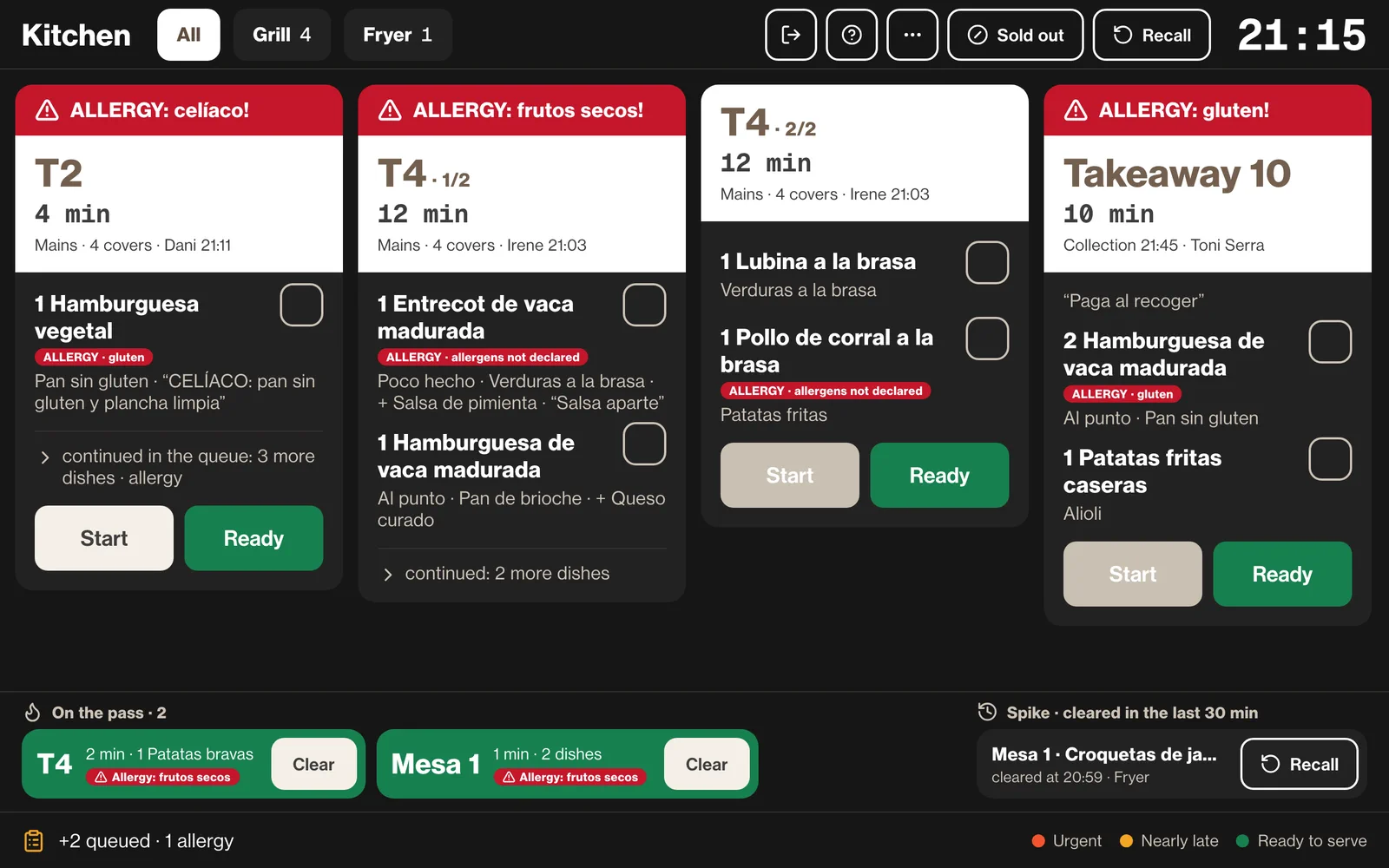
    Every ticket with its table and its minutes. The warning on top, in red. Nobody has to shout it.

    The kitchen screen: each ticket with its table, its minutes and its dishes, and the allergy in a red band right at the top. Below, what is waiting at the pass and the colour key.
  5. Close the till and go home.

    Cash, card or Bizum: every payment was already recorded. The close does itself, cash count included.

    The day’s till: what has been taken by card, Bizum and cash, what is still to be paid, the cash book with every receipt and, alongside, how the end-of-day close will come out.
Saturday’s bookings on the computer: bookings, arrivals, occupancy and covers over capacity; the day note; and “Now”, with the tables waiting for a dish or taking a while to order, and the group of ten arriving at 21:30.
The floor screen at Can Mostra, the demo restaurant, on a Saturday at 21:15: seated tables in beige, tables with dishes waiting at the pass in amber, tables that have gone a while without ordering with a coral border and their minutes, and a red triangle on tables with an allergy. On the right, “Now”: what needs doing first.
Table T4’s order on the tablet: the menu by section on one side and, on the other, the order grouped by course, showing what has been served and what is ready. At the top, in red, the nut allergy; at the bottom, the total and the buttons to ask for the bill and take payment.
The kitchen screen: each ticket with its table, its minutes and its dishes, and the allergy in a red band right at the top. Below, what is waiting at the pass and the colour key.
The day’s till: what has been taken by card, Bizum and cash, what is still to be paid, the cash book with every receipt and, alongside, how the end-of-day close will come out.

See the system from the inside

Works without the internet

Internet down?
Service carries on.

If we install it on a computer in your restaurant, the floor, orders, kitchen and till keep going over the wifi. Only the booking page and messages have to wait.

Prefer the cloud? Same fee.

Support

Ten o’clock on a Saturday, and a real person replies.

On WhatsApp, with someone who knows the system because they built it. If the problem is ours, we fix it; if it’s yours, we explain it to you.

  • Every day, 12:00 to 00:00
  • In under 30 minutes
Pasaplatos supportOnline
  1. The kitchen printer isn’t printing the orders.22:14
  2. Let’s take a look. Is the green light on?22:19
  3. Yes, green.22:20
  4. Done: the order was stuck in the print queue. Try sending it again.22:23
An example conversation.

And also

The things you don’t see, too.

Pricing

Public pricing.
The same for everyone.

Per restaurant, per month, plus VAT. As many users and tablets as you like.

Floor

Bookings, floor and guests. Works alongside the POS you already have.

€49a month

  • Bookings diary and floor plan
  • Your booking page and your menu with allergens
  • Waiting list and guest profiles
  • Reminders, reviews and reports
Try it for 30 days

It doesn’t issue receipts, so Verifactu doesn’t apply.

Service

Orders, kitchen and till, for anyone who already handles bookings another way.

€69a month

  • Orders on a tablet, with options and allergens
  • Kitchen screen by station
  • Till, receipts and close with a cash count
  • Direct printing in the kitchen and at the till
Try it for 30 days

Verifactu included. It isn’t active yet.

House special

All-in-one

The whole service, from booking to receipt, in a single system.

€95a month

  • Everything in Floor and Service
  • The guest profile brings bookings and spending together
  • Reports that cross-reference occupancy and sales
Try it for 30 days

Verifactu included. It isn’t active yet.

See all the details and do the maths

Getting started

How we get started.

  1. Try the demo

    A demo restaurant on a busy Saturday. No sign-up.

  2. We come to you

    An hour to see how you work. If you’re far away, over a video call.

  3. We set it up

    Menu, allergens, tables and opening hours. If you’re coming from another system, we bring your guests over.

  4. Thirty days to decide

    With us on the other end of WhatsApp. If it’s not for you, you take your data with you.

Where we come from

It started as a favour to a waitress.

She worked in a burger restaurant in the Baix Llobregat, near Barcelona, where the booking website froze and lost bookings in the middle of service. We built it for her. That’s why we try to break every release on purpose.

About us

Founding restaurants

The first ten get featured on this website.

If you’re one of the first ten restaurants to stay with Pasaplatos, we advertise you here for free, with your name, your neighbourhood and a link to your bookings. All ten places are still open.

FAQ

What people ask us before trying it.

See all the questions

Do you charge per cover or per booking?

No. You pay a flat monthly fee per restaurant. Nothing per booking, nothing per cover, no percentage of sales: a busier month doesn’t cost you more.

Is there a lock-in contract?

No. You cancel from the system, without calling anyone, and before you go you can take all your data with you in files that open in Excel.

Does it work with the POS I already have?

Yes, with the Floor plan: bookings, floor plan and guests, without issuing receipts. If you later want orders, kitchen and till, you switch plans without losing anything.

What if the internet goes down?

If it’s installed on a computer in your restaurant, the floor, orders, kitchen and till keep going over the wifi. Only the booking page and messages have to wait.

Is it Verifactu compliant?

It isn’t active yet. The Service and All-in-one plans will include it at no extra cost. The Floor plan doesn’t issue receipts, so it doesn’t apply.

Watch a Saturday service in full swing.

The demo is the real system, with a demo restaurant. No sign-up and no sales call.