Product
From booking to receipt, without switching systems.
Each screen knows what happened on the one before. The booking becomes a table, the table an order, the order a receipt, and it all stays on the guest’s profile.
- Try it yourself: the demo is the real system, with no sign-up and no sales call. The screenshots show Can Mostra, a sample restaurant
Bookings
The guest books on their phone. You don’t do a thing.
A booking page with your name and your menu, showing the times genuinely still free at your tables. Bookings are confirmed on the spot, and the day before the guest gets a reminder by email, or you send one on WhatsApp from Messages.
- Large groups come in as requests, so you get to decide.
- A deposit for groups, if you want one, which then comes off the bill.
- The whole day in the bookings diary: who’s coming, at what time and with which allergies.

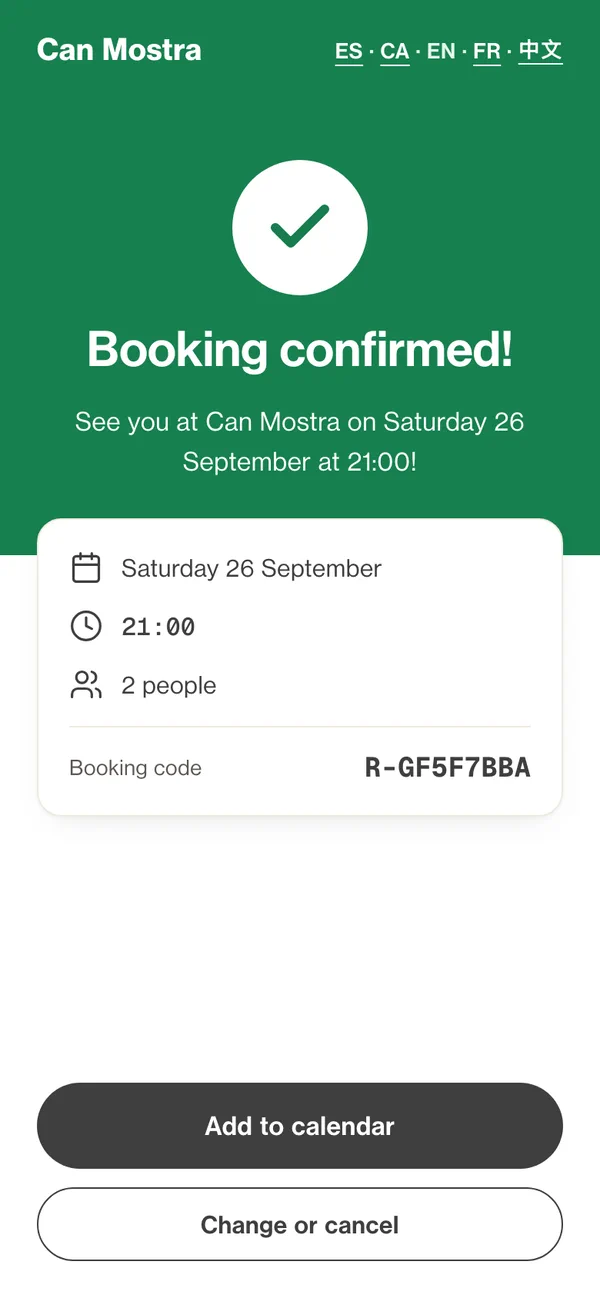
Saturday’s bookings and, in front, what the guest sees after booking: in Spanish, Catalan, English, French or Chinese, whichever they prefer.
Your booking page
With your name, your menu and its allergens. It only offers the times when a table genuinely fits.
Reminders
The confirmation on the spot and a reminder the day before. By email it goes out on its own; on WhatsApp you send it from Messages, with the text already written.
Waiting list
When you’re full, guests join the list. When a table frees up, the next person is notified.
Floor
Every table tells you how it’s doing.
On the floor plan, each table’s colour tells you how it’s doing: plain when it’s free, with its time when it’s booked, beige when it’s seated and all is well, and amber when dishes are waiting at the pass. Whatever can’t wait gets a coral border: the bill, or a table that has gone a while without ordering, with its minutes.
- Free
- Seated
- Dishes at the pass
- Can’t wait
- Allergy
- Allergies and requests in plain view from the moment they sit down.
- Guests with a booking are seated with one tap; so are walk-ins.
- Switching tables or joining two: drag and drop.
- No-shows are recorded on their guest profile.

The floor on the tablet. On the right, “Now”: what needs doing first.
Orders
Ordered at the table, it shows up in the kitchen. No paper, no shouting.
Every item with its options: how the meat is cooked, the bread, the extras, what to leave out. Allergens, from the menu to the order. Drinks go to the bar and food to the kitchen, each to its own station.
- Fire courses: starters first, mains when you say so.
- On the tablet or on the waiter’s phone.
- Takeaway and delivery orders on the same screen, entered by hand: no connection to the delivery platforms.
- Voiding an item leaves a record of who did it and why.


The order on the tablet and, in front, the open orders on the waiter’s phone. The allergy warning sits right on the dish.
14allergens that must be declared
From the menu to the kitchen, without anyone writing them down again.
0orders re-entered by hand at the till
What’s ordered at the table is already on the bill.
Paperstraight to the printer
Orders and receipts come straight out of the thermal printers in the kitchen and at the till.
Kitchen
The allergy arrives before the dish.
The screen that hangs on the wall and calls back “heard”. Each ticket shows its minutes and its header changes colour: white when it comes in, amber as the time gets close, coral when it’s late and green when it’s ready to serve. The allergy goes right at the top, in red. Nobody has to watch the clock.
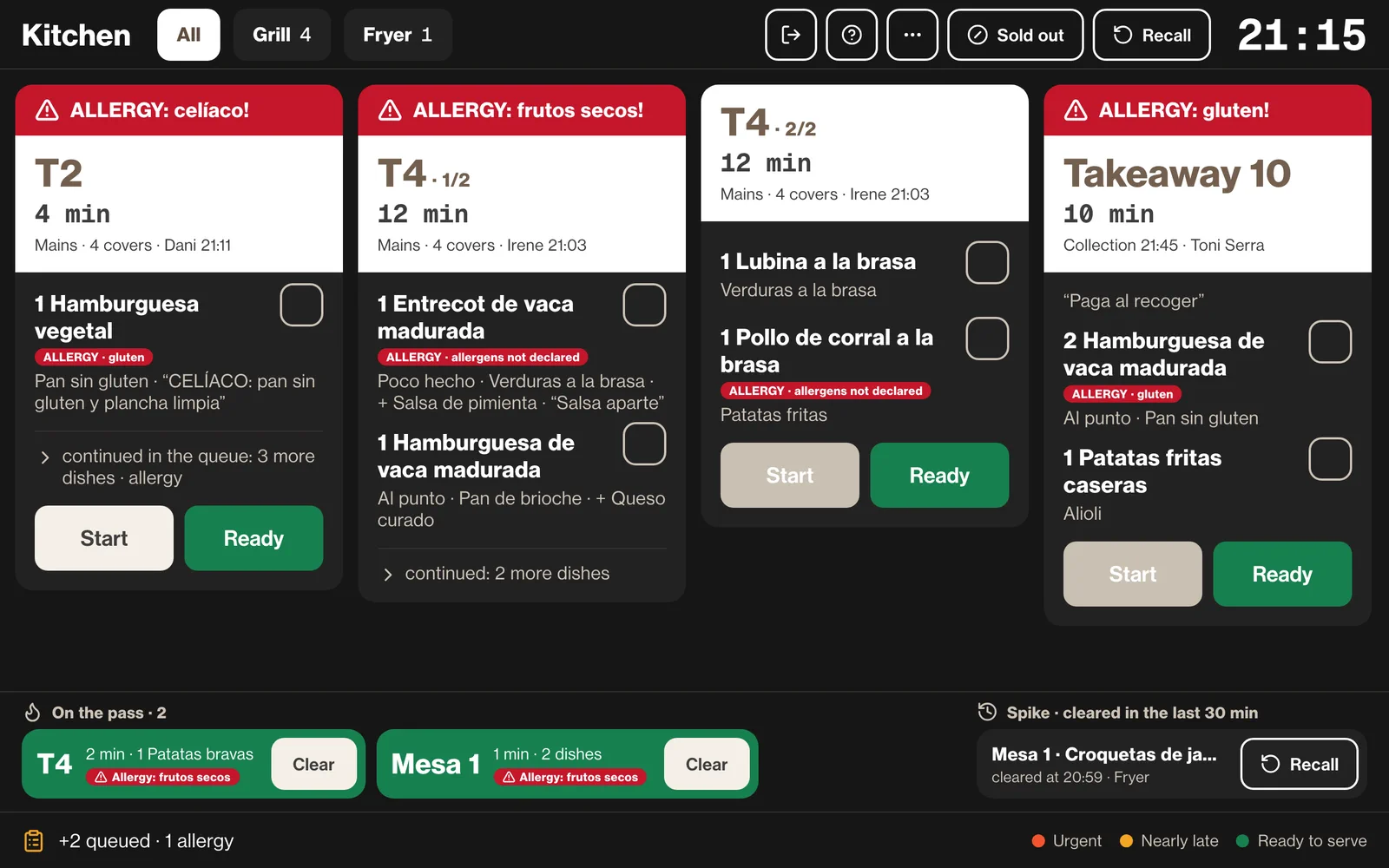
The kitchen screen: each ticket with its table and its minutes, and below, what is waiting at the pass.
By station
Grill, fryer, bar and desserts only see what’s theirs. Or everything, if the kitchen is small.
Beeps when it comes in
One beep when the order arrives, and another if nobody has started it after a minute. No need to keep watching.
Recall a ticket
Cleared by mistake: one tap brings it back, with its original time.
Light background
The screen has a dark background, which doesn’t glare and reads from a distance. For very bright kitchens, one setting switches it to a light one.
Till
Payment is taken at the table and the receipt prints itself.
Cash, card, Bizum or split. The receipt comes out with the VAT breakdown, in Spanish and Catalan. If they ask for an invoice with their tax ID (NIF), it’s two more taps.
- Till opening, cash movements and closing with a cash count. The end-of-day close is generated automatically.
- Items on the house, discounts and refunds, logged with who and why.
Verifactu, included in the price with no separate module. It isn’t active yet. It becomes mandatory for your restaurant on 1 January 2027 if it’s a company and on 1 July 2027 if it’s run by a sole trader or under joint ownership. With Verifactu active, the receipt also carries its QR code.

The day’s till: what has been taken each way, the cash book and the close as it will come out.
Guests
Every visit, on their profile.
Every guest has a profile with their visits, their allergies and their no-shows. With the All-in-one plan, it also shows what they ordered and what they spent: the booking and the bill, together.
- Bring your guests over from another system with a spreadsheet; duplicates are flagged before saving.
- Reviews are requested after the visit, in the guest’s language.

The guest list, with allergies in red next to the name.
Reports
How the day went. And the month.
Bookings, sales, kitchen, reviews and waiting list, compared with the previous period. Print them or export them to a spreadsheet. With the All-in-one plan, the report cross-references occupancy with sales.

The booking report for the last 30 days, with Can Mostra’s sample data.
Works without the internet
Internet down? Service carries on.
If we install it on a computer in your restaurant, the floor, orders, kitchen and till keep going over the wifi. Only the booking page and messages have to wait. Prefer the cloud? Same fee.
Five languages
Everyone in their own.
The app comes in Spanish, Catalan, English, French and Chinese. Everyone on the team picks their own, and guests see the menu, the booking page and the feedback request in theirs. Receipts come out in Spanish and Catalan.
Think it’s a fit? Try it yourself.
The demo is the real system, with a demo restaurant on a busy Saturday. And if it convinces you, we set it up for you to try for thirty days.